1. 基本名词
master: 默认开发分支
origin: 默认远程版本库
index/stage: 暂存区
workspace: 工作区
repository: 本地仓库
remote: 远程仓库
2. 基本概念
- 工作区:在电脑中能看到的目录
- 暂存区:(stage/index), 一般存放在.git目录的index文件中
- 版本库:工作区的.git目录就是git的版本库
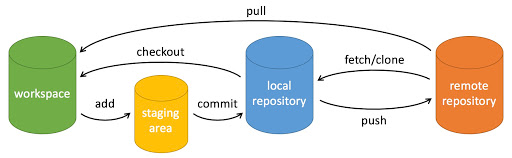
git的版本库文件(.git)目录介绍
❯Bash
.git
├── branches
├── config # 当前git版本的一些配置信息  包括远程url 分支等...
├── description # 仓库的描述信息
├── FETCH_HEAD # 版本链接,指向当前从远程拉取到的最后一个版本
├── HEAD # 本地仓库 当前引用 文件保存内容为 `ref: refs/heads/branchName`本地仓库的当前分支
├── hooks # 一些shell脚本
├── index # 暂存区, 是一个bin文件, 第一次`git add`时候生成, 每一个索引都有一个40位的SHA-1 的Hash 和对应的文件名, 文件模式,权限和合并状态,时间戳等.....
├── info # 主要用于存放仓库的信息,可以添加全局忽略一些文件,文件夹等配置, `git add .`的时候不去添加进去,也可以写入根目录下的`.gitignore`文件中
│   └── exclude
├── logs # 提交日志
│   ├── HEAD # 指向本地当前分支的对应的提交日志
│   └── refs
├── modules
│   └── themes
├── objects # 所有文件的对象
│   ├── info
│   └── pack
├── ORIG_HEAD # 远程仓库的最后一次记录状态,当前引用
├── packed-refs # clone仓库时所有的引用
└── refs
    ├── heads # 本地分支
    ├── remotes # 远程分支
    └── tags # 标签
3. 基本命令
| 命令 | 解释 |
|---|---|
| git config | 用于git的基本信息配置 |
| git init | 可以将当前目录初始化为一个空仓库,并创建一个.git的目录 |
| git status | 显示文件状态 ,红色表示工作目录的文件已修改未提交,绿色表示文件已提交 |
| git add | 将文件从工作目录添加至暂存区 |
| git commit | 将暂存区的修改提交到本地仓库,同时会生成一个commmit-id |
| git pull | 获取远程主机某个分支的更新,再与本地指定分支合并 |
| git feach | 将远程主机上所有分支的更新取回本地,并记录在.git/FETCH_HEAD中 |
| git push | 将本地分支的更新推送到远程主机上 |
| git branch | 分支管理操作 |
| git checkout | 创建和切换分支以及撤销工作区的修改 |
| git tag | 对项目标签进行管理 |
| git log | 查看历史提交记录 |
| git reset | 撤销暂存区的修改或本地仓库的提交 |
| git remote | 管理远程仓库 |
| git merge | 分支的合并 |
| git stash | 不提交当前分支修改,切换到其他分支查看,可以使用git stash保存当前的修改 |
| git ignore | 忽略那些没必要的提交 |
4. 基本操作
新建代码仓库
❯Bash
# 在当前目录新建一个Git代码仓库
git init
# 新建一个目录并初始化为Git代码仓库
git init [projiet-name]
# 下载一个项目和他的整个历史代码
git clone [url]  # 有https和ssh两种下载方式
# 克隆整个主项目和子项目的全部代码 到指定目录
git clone [url] ./test_dir --recursive
基本配置
❯Bash
# git 版本更新(windows)
git update-git-for-windows
# 显示当前配置
git config --list
# 编辑配置文件  --global参数用于全局配置  如果只配置当前git目录 则不用添加该参数
git config -e --global
# 设置用户信息
git config --global user.name "name"
git config --global user.email "email address"
# 查看单个配置信息
git config user.name
git config user.email
# 定义别名  方便操作(非必要)
git config --global alias.st status:则git status可用git st代替
git config --global alias.co checkout:则git checkout可用git co代替
git config --global alias.ci commit:则git commit可用git ci代替
git config --global alias.br branch:则git branch可用git br代替
文件的增删改
❯Bash
# 查看文件状态
git status
git status -s  # 极简的方式显示文件状态
        A:本地新增的文件(服务器上没有)
        C:文件的一个新拷贝
        D:本地删除的文件(服务器上还在)
        M:红色为修改过未被添加进暂存区的,绿色为已经添加进暂存区的
        R:文件名被修改
        T:文件的类型被修改
        U:文件没有被合并(你需要完成合并才能进行提交)
        X:未知状态(很可能是遇到git的bug了,你可以向git提交bug report)
        ?:未被git进行管理,可以使用git add fileName把文件添加进来进行管理
git stash
# 查看变更内容  查看git status的详细信息
git diff
    尚未缓存的改动:git diff
    查看已缓存的改动: git diff --cached
    查看已缓存的与未缓存的所有改动:git diff HEAD
    显示摘要而非整个 diff:git diff --stat
# 添加指定文件到暂存区
git add [file1] [file2]...
# 添加指定目录到暂存区(递归添加)
git add [dir]
# 添加当前目录所有文件
git add .
git add --all  # 添加所有文件
git add *.c  # 添加所有.c文件
git add --update  # 添加已跟踪文件
# 删除工作区文件 并将删除文件放在暂存区
git rm [file1] [file2] ...
# 停止追踪指定文件 但文件会保留到工作区
git rm --cached [file]
# 改名文件,并将这个文件放入暂存区
git mv [file-original] [file-renamed]
代码提交
❯Bash
# 提交暂存区到仓库
git commit -m 'commit message'
# 提交暂存区指定文件到仓库
git commit [file1] [file2] ... -m 'commit message'
# 提交工作区自上次commit之后的变化,直接到仓库
git commit -a -m 'commit message'
相当于: git add . + git add -m "message"
# 提交时显示所有diff信息
git commit -v
# 使用一次新的commit,代替上一次提交
# 如果代码没有变化,则用来改写上一次commit的提交信息
git commit --amend -m 'commit message'
# 重做上一次commit,并包括指定文件的新变化
git commit -amend [file1] [file2] ...
# 修改最后一次提交
git commit --amend
分支管理
❯Bash
# 查看本地分支
git branch
# 查看本地和远程分支 *的位置表示当前分支
git branch -a
# 新建测试分支
git branch test
# 更改分支名字
git branch -m test my_test
# 删除分支
git branch -d dev
# 切换到某个标签对应的版本
git checkout tag001
# 创建和切换分支
git checkout -b test
git checkout -b test tag001  # 在tag001标签创建新分支
----相当于 git branch test tag001
       git checkout tag001

# 合并某个分([branch)到当前分支
git merge [branch]
# 将当前目录所有文件从HEAD移除并且恢复成未修改的样子
git checkout .
# 撤销工作目录中文件的修改(文件改动但未git add)
git checkout --fileName
# 拉取远程test分支并创建本地test分支
git checkout -b test origin/test
标签管理
❯Bash
# 列出所有本地标签
git tag
# 根据最新提交创建标签
git tag <tagname>
# 创建一个带注解的标签, 给最新提交
git tag -a <tagname>
# 指定标签信息命令:
git tag -a <tagname> -m "标签"
# 删除标签
git tag -d <tagname>
查看信息
❯Bash
# 查看历史提交记录
git log
# 每天历史记录打印一行
git log --oneline
# 查看某个人的提交记录
git log --author='name'
# 查看ascii图形分支合并
git log --graph
# 显示n条日志
git log -n
# 显示木一个日期之后/之前/之间的记录
git log --after='2020-08-08' [--before='2020-08-26']
远程操作
❯Bash
# 查看所有远端仓库
git remote -v
# 显示某个远端仓库信息
git remote show [remote]
# 添加远端版本库
git remote add [shortname] [url]
    -- shortname 为本地版本库 可以不写  就默认和远端相同
# 删除远端仓库
git remote rm name
# 修改远端仓库名
git remote rename old_name new_name
# 从远程分支更新,和本地分支合并  git pull [remote host name][remote branch]:[local branch]
git pull origin master:hotfix(远端master合并到本地hotfix)
git pull origin master (合并到当前分支)
# 获取远程主机所有分支的更新的数据  只拉取  不合并
git fetch [alias]
# 获取远端所有的tag
git pull --tags
# 获取远端分支 并且删除远端已经不存在的分支
git pull --prune
# 拉取完毕后  合并 远端数据合并到当前分支
git merge [alias]/[branch]
# 推送本地分支到远程主机 git push [remote host name] [local branch]:[remote branch]
git push origin master:master
git push origin master (本地分支和远端分支名称相同)
git push --force origin master (本地和远程版本有差异 强制推送)
# 删除远端origin主机的master分支
git push origin --delete master
# 密钥生成 rsa 非对称密钥  会生成公钥和私钥
ssh-keygen -t rsa -C 'eamil'
# 添加远程仓库
git remote add origin https://.............
# 更新远程分支列表
git remote update origin --prune
git remote update origin --p
撤销
❯Bash
# 撤销提交打暂存区文件(git add 但是未git commit)
git reset HEAD fileName  / git reset --mixed HEAD fileNAme
# 撤销所有提交
git reset HEAD . / git reset --mixed HEAD .
# 提交到本地仓库做撤销(已经git commit 但是未git push)
# 头指针恢复, 已经提交到暂存区已经工作区内容不变
git reset --soft commit-id
git reset --soft HEAD~1
# 头指针恢复并撤销暂存区提交, 但是工作区内容不变
git reset --mixed commit-id
git reset --mixed HEAD~1
# 将所有内容恢复到指定版本
git reset --hard commit-id
git reset --hard HEAD~1
# commit-id 可以通过git log查看  取6位即可  HEAD~1表示前一次提交(以此类推)
子模块处理
❯Bash
# 添加子模块组件到本地dir目录
git submodule add [url] [dir]
# 将某个子模块[dir]设置跟踪到[dev]分支
git submodule set-branch -b [dev] [dir]
# 更新子模块到最新
git submodule update
# 子模块初始化
git submodule init
# 更新子模块到当前提交点的最新
git submodule update --init --recursive
git commit 常用前缀
- feat: 新功能 (feature)
- fix: 修复bug, 可以是QA发现的,也可以是自己发现的
- docs: 文档更新
- style: 格式更新(不影响代码运行的变动)
- refactor: 重构(不是新功能和bug代码改动)
- perf: 优化相关,比如模块升级,体验优化
- test: 增加测试
- chore: 构建过程或者辅助工具变动
- revert: 回滚到上一版本
- merge: 代码合并
- sync: 同步主线或者分支的bug